Open to Public & Trade | Visit Our Ormeau HQ: 2/46 Blanck St Ormeau QLD 4208 | Call: (07) 5580 6993 | Weekdays 8 AM – 4 PM | Fast Australia-Wide Shipping | Get a Quote
Tactile indicators show up in almost every commercial project today, and it’s completely normal for project managers to feel unsure about the exact rules. Questions around placement, type selection, luminance contrast and DDA requirements come up constantly. This guide gives you the clarity you need by explaining tactile ground surface indicators (TGSIs) in simple, practical language and outlining the key standards AS/NZS 1428.4.1 and the Disability Discrimination Act (DDA) that determine compliance across Australian sites. Everything here aligns with the relevant regulations, so you can move through your project with confidence.
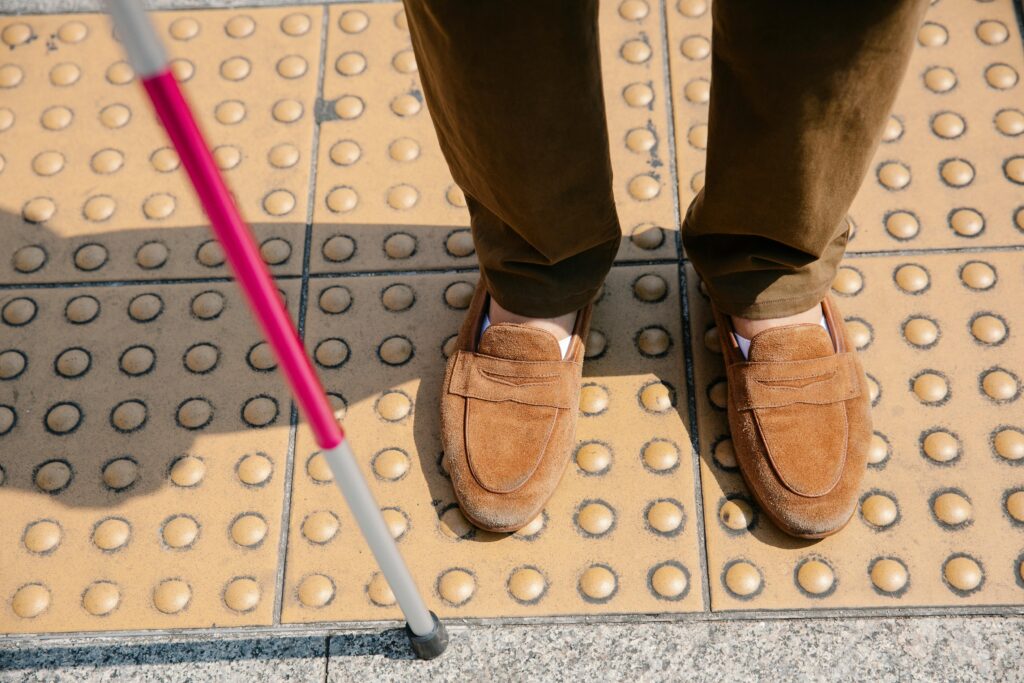
TGSIs are textured ground surfaces used to support people who are blind or have low vision as they move through public spaces. You’ll see them at crossings, stairs, transport hubs, building entrances and anywhere a change in direction or level might create a safety risk. Their purpose is straightforward. Warning surfaces alert users to a hazard ahead, while directional surfaces guide users along a defined path when the route is not obvious.
These surfaces are essential for meeting obligations under the DDA. While the DDA does not provide measurements or spacing rules, it requires that public spaces are accessible. Compliant installations play a major role in delivering on that obligation. They help prevent accidents, create predictable navigation paths and ensure that anyone accessing the site can move safely and independently.
This is where many project teams get stuck, because the combination of federal legislation, national standards and council overlays can feel overwhelming. In reality, each element has a clear purpose. The DDA sets the expectation that people with disabilities must not be disadvantaged when accessing public spaces. AS/NZS 1428.4.1 standards then explain exactly how tactile indicators must be designed, selected and installed to achieve that outcome.
The standard outlines the finer details, such as acceptable spacing, correct placement near hazards, the required luminance contrast between the surface and the surrounding ground, the dimensions of studs or bars, and the slip resistance needed in various environments. If your installation meets this standard, you’re almost always compliant.
Local councils and transport authorities can add their own requirements, particularly around luminance contrast thresholds, material preference or slip resistance ratings. These additions are usually based on local environmental conditions or safety considerations. Checking these requirements early in the project helps you avoid last-minute redesigns or failed inspections.
Using compliant products isn’t optional. Cheap, non-certified imports often fail luminance contrast, wear down quickly or don’t meet spacing requirements. Even a small deviation from the standard can lead to non-compliance, which then creates delays, rework and added cost during final inspection.
The standard dictates all the practical elements that affect installation. It sets precise rules for placement, ensuring warning surfaces appear within the correct distance of stairs, ramps and platform edges. It defines luminance contrast, requiring a measurable difference between the surface and its background so users with low vision can detect the cues. It also provides guidance on spacing so the pattern is consistent and meaningful underfoot, and establishes requirements for slip resistance and stud or bar dimensions.
Mistakes usually happen when teams install surfaces too far from a hazard, rely on manufacturers without certified spacing, or calculate luminance contrast only to discover later that new flooring materials changed the contrast outcomes. Understanding the standard early helps avoid these common traps.
DDA obligations apply to new buildings, refurbishments and any public area that is reasonably expected to be accessed by a wide range of users. In practice, this means shopping centres, schools, transport hubs, hospitals, commercial buildings and public domain projects must include compliant surfaces. Importantly, the DDA places an ongoing requirement on site operators. If these surfaces become worn, damaged or loose over time, the site may no longer meet expectations for safe access, even if the original installation was compliant.
Project managers often want a straightforward rule for where tactile ground surface indicators are required, and while every site is a little different, the principles are consistent. Warning surfaces must appear wherever there is a sudden change in level or a potential risk, such as at kerb ramps, stairways, escalator approaches, pedestrian crossings, building entrances, ramps or platform edges. Directional tactile indicators are installed where movement is unclear or where users need guidance across open spaces, through transport hubs, towards building entrances or between key circulation points inside a facility.
Warning TGSIs serve as a warning, so placement is critical. They need to be installed at the correct setback from the hazard, close enough to warn users in time but not so close that they become a trip point. Access consultants frequently see issues where tiles are installed too far back, where the pattern falls outside spacing allowances or where tiles are misaligned with the direction of travel. Any of these errors can lead to compliance issues or even create new safety risks.
Directional TGSIs act as a guide for people moving through open spaces or approaching a particular point. They are commonly used in large lobbies, transport interchanges, outdoor plazas or complex circulation spaces where the route isn’t immediately obvious. The bars must run in the direction of travel and provide a continuous path that connects cleanly into warning surfaces at decision points or destinations. Losing this continuity is one of the most common layout errors on commercial projects.
Selecting the correct tactile indicator system has a major influence on long term performance and compliance. Integrated tactile indicators, where the surface is recessed or built into the flooring, are often preferred for new constructions because they are durable, visually cohesive and less prone to lifting over time. Discrete tactile Indicators, individual studs or bars are more commonly used for retrofits because they’re easier to install without disturbing existing flooring.
Material choice matters too. Stainless steel provides durability in high traffic or outdoor environments, polyurethane offers design flexibility and ceramic or concrete options work well in architectural or premium applications. Regardless of material, the slip resistance and luminance contrast must meet AS/NZS 1428.4.1, and this should be verified with certified test data.
Integrated tactile indicators are built directly into the surface material, like concrete or paving, creating a smooth and permanent solution. This makes them a popular choice for new builds, as they reduce the risk of tripping hazards, last longer, and generally need less maintenance.
Discrete tactile indicators are separate units installed onto an existing surface, which makes them ideal for retrofits or upgrades where replacing the entire surface is not practical. While they are flexible and can be replaced individually if damaged, careful attention is needed during installation to ensure proper spacing, alignment, and secure fixing so they meet AS/NZS 1428.4.1 and DDA requirements. Understanding the strengths and limitations of each type early in the project helps prevent common mistakes, keeps the site safe, and ensures inspections go smoothly. Collaborating with suppliers who know Australian standards well can save time, reduce defects, and make compliance much easier to manage.
Luminance contrast failures are among the most frequent issues raised during inspections. Often, the problem is not the surface itself but the surrounding flooring. If the final surface finish differs from the one used in the luminance contrast calculation, the entire installation may fail. The easiest way to avoid this is to confirm the Luminance Reflectance Values of both the flooring and the surface once selections are finalised. Using certified products with verified data prevents the guesswork that leads to costly rework..
Despite the number of projects that include TGSIs, the same mistakes appear repeatedly. Incorrect spacing, non-compliant stud dimensions, poor adhesion, insufficient luminance contrast and surfaces placed too close or too far from a hazard are all issues that quickly derail certification. Another frequent problem is ignoring manufacturer installation methods, which can void warranties and impact safety. Many projects also run into trouble when documentation is not prepared early, leaving teams scrambling to produce compliance evidence at the end of the build.
Maintaining a simple internal checklist that covers product certification, surface type, luminance contrast, slip rating, layout accuracy, installation method and council overlays helps teams avoid almost all common issues.
Keeping compliance simple and straightforward helps project teams avoid mistakes and stay on track. The checklist covers the essential points:
This format makes it easy for teams to quickly verify compliance during planning, installation, and inspections.
The best product will still fail if it’s installed incorrectly. Using the right adhesives or mechanical fixings is essential, especially in outdoor zones or high-traffic sites. Recessed or integrated surfaces minimise trip hazards and reduce the likelihood of studs coming loose. Scheduling maintenance inspections ensures worn or damaged surfaces are replaced before they become a safety risk. For commercial sites, maintaining compliance over time is just as important as meeting the standard on day one.
Certifiers and access consultants will ask for product data sheets, spacing diagrams, Luminance Reflectance Value reports, installation records and photographs. Keeping these documents organised makes sign off easier and prevents unnecessary delays. It also ensures future inspections or refurbishments can be supported with accurate information.
A reliable supplier such as Tactile Systems helps prevent many of the issues that typically appear late in a project. Using fully compliant products means you’re not relying on low quality imports that might fail TGSI Australian standards. You also gain access to technical guidance, luminance contrast support, installation advice and consistent product availability. All of this helps reduce rework, avoid delays and keep your project moving toward timely completion.
If you’re unsure what your site requires, seeking early guidance helps avoid unnecessary complexity. A technical specialist can review your plans, assess compliance needs and recommend solutions that align with AS/NZS 1428.4.1 without adding unnecessary costs.
Tactile indicator compliance doesn’t need to be complicated. Understanding the standards, selecting the right products and following proper installation methods ensures your project meets DDA and AS/NZS 1428.4.1 requirements with confidence. When you’re planning your next project, the team at Tactile Systems is ready to assist with technical support and reliable, compliant solutions.
Open to Public & Trade | Visit Our Ormeau HQ: 2/46 Blanck St Ormeau QLD 4208 | Call: (07) 5580 6993 | Weekdays 8 AM – 4 PM | Fast Australia-Wide Shipping | Get a Quote