Open to Public & Trade | Visit Our Ormeau HQ: 2/46 Blanck St Ormeau QLD 4208 | Call: (07) 5580 6993 | Weekdays 8 AM – 4 PM | Fast Australia-Wide Shipping | Get a Quote
Once a building opens, tactile indicators operate as permanent accessibility systems guiding people with vision impairment through public space. Their performance affects safety, compliance, and trust in the built environment.
For project managers, accountability does not stop once practical completion is reached. Design intent, coordination decisions, and sequencing choices resurface during access audits, certification reviews, and real-world use. Getting tactile indicators right protects occupants, supports approvals, and shields professional reputations long after the site team departs.
Tactile indicators serve a specific and critical user group: people with vision impairment navigating finished environments. Their purpose centres on orientation, warning, and decision-making in public spaces. Confusing this role with construction-stage hazard control often leads projects down the wrong path.
Errors connected with tactile indicators affect public safety directly. Incorrect placement creates misleading cues. Poor contrast reduces detectability. Inconsistent layouts confuse users who rely on predictable patterns. These issues rarely show up during construction, yet surface quickly once spaces open.
Compliance consequences follow soon after. Access audits, occupancy approvals, and certification processes assess tactile indicators against strict criteria. Failures discovered late demand rework under intense time pressure, frequently impacting opening dates and stakeholder confidence.
Project managers carry responsibility beyond handover. Issues identified during occupation reflect upstream decisions, documentation quality, and coordination effectiveness. Mistakes become expensive and visible when correction options narrow and reputational exposure increases.
Most failures involving tactile ground surface indicators originate from coordination breakdowns rather than unsuitable products. Responsibility sits upstream, within how information flows between consultants, contractors, and trades throughout the project lifecycle.
Architects define spatial intent. Access consultants interpret compliance requirements. Engineers influence gradients and tolerances. Trades execute installation under project constraints. Without clear leadership, these interfaces drift apart. Small discrepancies compound until non-compliance appears during inspection or access audit.
Strong project oversight keeps tactile ground surface indicators aligned with final finishes, floor build-ups, gradients, and pedestrian movement paths. This coordination is especially important when stainless steel tactile indicators are used with architectural flooring systems and tight tolerances. Late substitutions or undocumented changes introduce compliance risk that no installer can resolve alone. Early engagement, coordinated documentation, and clear accountability reduce that exposure significantly.
Effective tactile layouts respond to real pedestrian behaviour. Desire lines, approach angles, stopping points, and transitions dictate correct placement.
Internal environments present controlled lighting, consistent surfaces, and predictable movement. External spaces face weather exposure, variable lighting, and broader movement patterns. Transitional zones linking both demand careful consideration, especially near entries and exits.
Generic placement applied without understanding how people actually move leads to non-compliance. Project managers who challenge generic layouts and demand context-driven solutions achieve safer, more intuitive outcomes.
Choosing the right tactile ground surface indicators (TGSIs) isn’t a “one-size-fits-all” task; the material that thrives in a quiet office lobby might fail on a busy train platform.
Below are some key considerations when selecting the ideal tactile solution based on site conditions, foot traffic, and durability requirements.
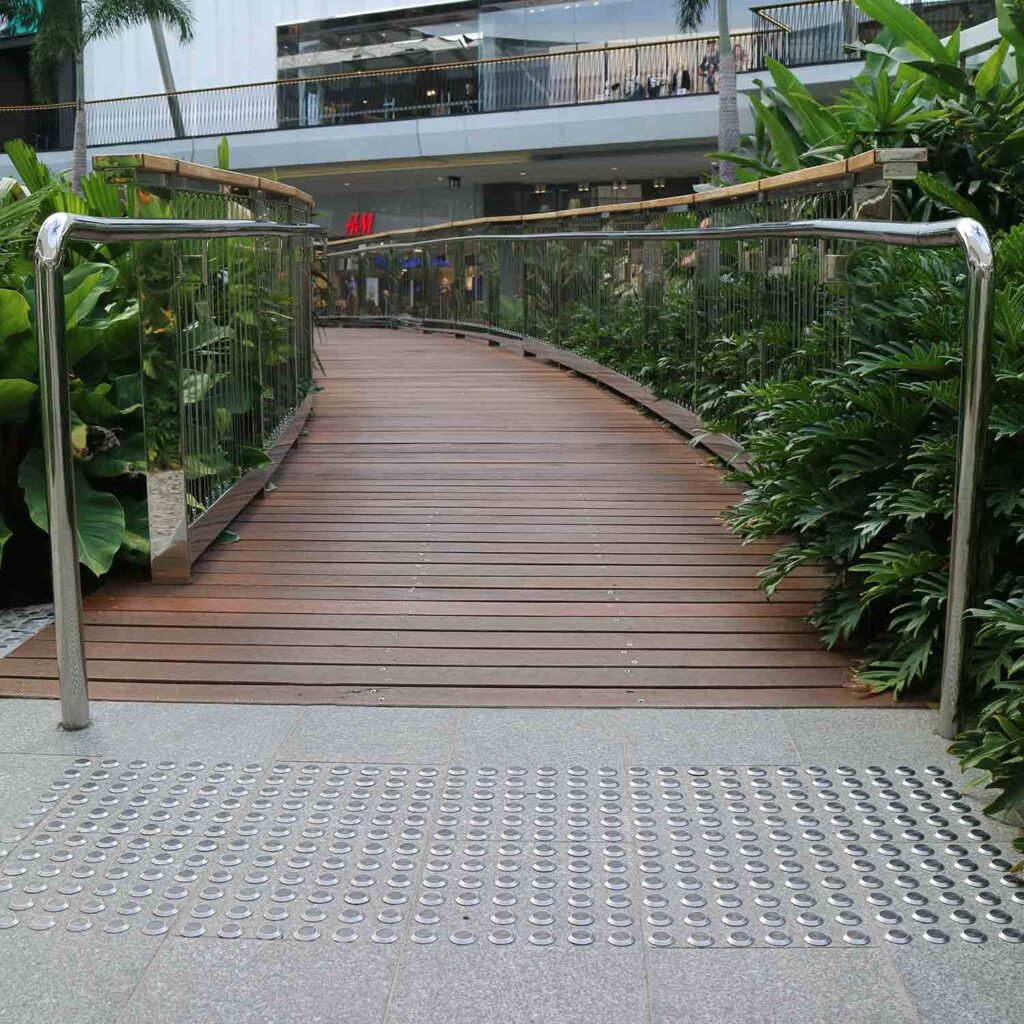
Discrete tactile indicators are individual studs or “plugs” that are installed directly into the substrate. They are the “premium” choice for modern architecture.
Why Choose Discrete?
The Trade-off: Installation is labour-intensive. Every single stud requires a precision-drilled hole, making them a higher-cost investment in terms of time and labour.
Integrated tactile indicators come as a pre-formed tile or mat where the truncated domes are part of a solid base.
Why Choose Integrated?
The Trade-off: They are visually prominent. While perfect for safety, they may not suit the “invisible” aesthetic required in boutique retail or high-end residential designs.
Key factors for selecting tactile indicators:
Access compliance leaves little room for interpretation. Good intentions offer no protection during inspection, particularly when assessed against the tactile indicators Australian standard requirements.
Minor dimensional errors trigger failures. Incorrect spacing, misaligned rows, or inconsistent offsets become obvious during audits. Tolerance creep across large areas undermines compliance even when individual sections appear acceptable under casual review.
Exposure extends beyond contractors. Project managers face scrutiny when documentation lacks clarity, coordination fails, or quality assurance processes fall short. Retrospective fixes often involve cutting finished floors or replacing large areas, driving cost and delay.
Accuracy achieved early, aligned with Australian standard expectations, saves time, money, and stress near handover.
Australian access requirements focus on measurable outcomes. Placement, spacing, alignment, and luminance contrast form the foundation of compliance assessment.
Consistency across entire sites matters as much as individual locations. Variations introduced through staged delivery or multiple installers compromise outcomes quickly. Assessors look for uniformity, predictability, and adherence to documented intent.
Clear drawings, verified samples, and consistent execution support successful certification across complex projects.
The timing of tactile indicator installation directly impacts compliance accuracy, durability, and finish quality. Incorrect sequencing remains one of the most common causes of defects.
Installation should occur:
Installing too early exposes tactile indicators to damage from equipment, material movement, and ongoing works. Installing too late increases the risk of spacing, alignment, and contrast errors.
Tactile indicators must be coordinated with:
Without defined installation windows and protection controls, even compliant layouts can fail before handover.
Installation timing is not simply a scheduling decision – it is a compliance and risk management control point. Proper sequencing protects both project timeline certainty and accessibility outcomes.
Tactile indicators appear regularly on defect lists. Typical issues include inconsistent alignment, damaged studs, poor adhesion, insufficient contrast, and incomplete coverage.
Early planning reduces these problems dramatically. Clear coordination, mock-ups, and installation guidance remove uncertainty during critical delivery stages.
Certification delays linked with tactile non-compliance stall occupation approvals and frustrate clients. Prevention delivers smoother handovers and calmer final weeks.
Compliance represents the minimum threshold, not the endpoint. Tactile indicators face daily wear from foot traffic, cleaning regimes, and environmental exposure across the life of a building.
Inferior systems degrade quickly. Loss of contrast and tactile definition compromises usability and increases liability risk. Public injury claims often reference incorrect placement or worn systems, particularly where integrated tactile indicators or discrete tactile indicators were specified without sufficient consideration of long-term durability and contrast retention.
Quality systems reduce maintenance burdens and limit long-term exposure. Decisions made during delivery, including the use of integrated tactile indicators or discrete tactile indicators within architectural finishes, influence operational risk and public safety outcomes for years.
Supplier involvement works best when framed as risk management rather than procurement alone. Experienced suppliers offer technical guidance during design development, helping align systems with substrates, finishes, and compliance requirements.
Installation support, training, and documentation strengthen outcomes across large or staged projects. Consistency across multiple areas prevents compliance drift and inspection failures.
Reliable suppliers act as technical partners supporting Project Managers throughout delivery.
Tactile indicators form permanent accessibility systems that shape how people navigate public spaces every day. Responsibility rests with project managers who influence outcomes well before installation begins, through early coordination, documentation clarity, and disciplined decision-making.
Early alignment between design intent, access advice, floor finishes, and sequencing protects compliance outcomes and reduces end-of-project pressure. Attention to detail during planning prevents costly rework, certification delays, and reputational risk once spaces open to the public.
Getting tactile indicators right safeguards users, preserves timelines, and protects professional credibility long after project completion. Reliable outcomes depend on treating tactile indicators as critical infrastructure rather than minor finishes.
Experienced specialists provide critical risk mitigation. From technical advice and compliant tactile indicator solutions to consistent project-wide delivery, the right partner supports certainty across complex builds and staged rollouts.
When compliance, safety, and reputation are on the line, partnering with Tactile Systems ensures accessible public spaces are delivered with confidence.
Open to Public & Trade | Visit Our Ormeau HQ: 2/46 Blanck St Ormeau QLD 4208 | Call: (07) 5580 6993 | Weekdays 8 AM – 4 PM | Fast Australia-Wide Shipping | Get a Quote